

Running paid traffic is not just about launching campaigns. It is also about making sure your CreatorTraffic account is funded the right way, at the right time, and with the payment method that makes the most sense for your setup. That part can feel confusing at first, especially when the platform offers several ways to add funds, different fee structures, and an auto-renewal option for creators who do not want their campaigns to stop unexpectedly.
This guide walks through the full CreatorTraffic payments flow from a creator’s point of view. It covers what needs to be completed before payments unlock, how the Add Funds section works, what each payment method looks like in practice, and how to choose the option that fits your budget, workflow, and campaign goals.
Getting Started Before Payments
The payments flow in CreatorTraffic starts before the checkout screen ever appears. First, a creator signs up from the main CreatorTraffic website and moves through the platform’s registration process. That setup can begin either with a standard email and password or through a Google account, which gives new users a simple choice right from the start.
After that, the platform asks for the core account details needed to create a working creator profile. This includes first name, last name, a contact login, and a contact method such as Telegram or WhatsApp. During the same process, the user also chooses whether the account is for a creator or an agency. For creators, the next step is adding one or more OnlyFans profile URLs. There is also an optional newsletter checkbox and a dropdown field asking where the user heard about CreatorTraffic.
Once registration is complete, the user lands in the main dashboard. That is where the real payments journey begins.
Why the Organization Profile Must Be Completed First
Before a creator can add funds inside CreatorTraffic, the platform requires one more setup step. If the user opens the Add Funds/Payments section too early, a warning appears telling them that the Organization Profile must be completed first. The same dashboard also makes it clear that campaigns cannot be created until this profile data is filled in, so this is not just a billing formality. It is part of getting the account ready for real use.
Inside the Organization Profile section, CreatorTraffic requires address details before payments are unlocked. That means the platform expects the account to have complete billing-related information in place before any money is added to the balance. For creators, this is important to know upfront. Registration gets the account into the dashboard, but it does not fully activate the payment side right away.
In practice, this creates a simple order: sign up, complete the Organization Profile, then move into funding the account and preparing campaigns.
How the Add Funds/Payments Page Works
Once the Organization Profile is completed, the Add Funds/Payments page becomes available. This is the main funding area for creators who want to prepare their balance before launching campaigns. At the top of the page, there is a field where the user enters the amount they want to add, and the amount is set in euros.
The interface also includes a short helper message explaining how the process works. To run a campaign, the account first needs payment details and available balance. The creator enters the desired top-up amount, then chooses one of the available payment methods shown on the page. The minimum funding amount displayed in the interface is 100 €, so smaller test deposits are not part of the standard flow here.
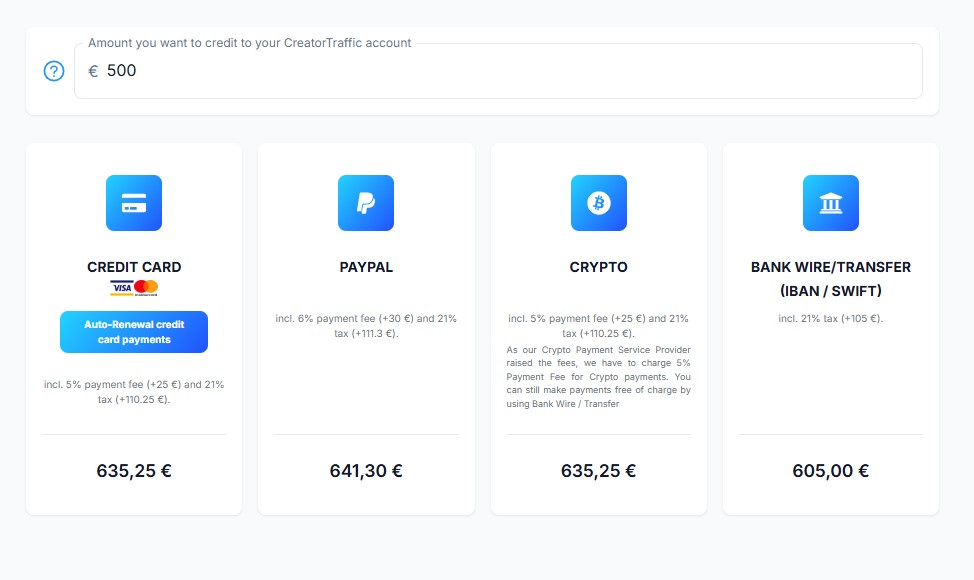
The page is built around four funding options: Credit Card, PayPal, Crypto, and Bank Wire/Transfer. Each one shows the final cost differently depending on the fee. That means the screen does more than list payment methods. It also gives creators an immediate view of how much they will actually pay before they move into checkout.
CreatorTraffic Payment Methods Overview
CreatorTraffic gives creators a few different ways to fund their account, and the right choice depends on what matters most in that moment. Some creators will care most about speed. Others will want the lowest possible cost. Some may prefer a familiar checkout flow, while others may want a system that keeps campaigns funded automatically.
The Credit Card option adds a 5% payment fee, so a planned 100 € top-up becomes 105 € at checkout. This method is also tied to the platform’s auto-renewal funding feature, which makes it more flexible than a standard one-time payment.
PayPal comes with a 6% payment fee, which brings a 100 € top-up to 106 €. It works well for creators who already keep funds in PayPal and prefer not to enter card details directly.
Crypto also shows a 5% payment fee on the CreatorTraffic side. This route is better suited to creators who are already comfortable paying through wallets and blockchain networks.
The only method shown without a payment fee is Bank Wire/Transfer. It takes more manual effort, but it keeps the total at the original amount and can be the most cost-efficient option for larger deposits.
How Credit Card Payments Work
For creators who want a direct online checkout, the Credit Card option is one of the fastest paths. In the payment column, the interface shows card support along with the note that the total includes a 5% payment fee. With a 100 € top-up, the final charge becomes 105,00 €.
When the creator clicks the card payment button, CreatorTraffic sends them to a hosted payment page. There, the final charge is shown clearly before any card details are entered. The payment page then asks for the cardholder name and the standard credit card information needed to complete the transaction. After that, the creator submits the payment through the external checkout form.
This flow is simple and easy to follow. It works well for creators who want to fund their balance quickly and move on to campaign setup without waiting for a manual transfer. The main trade-off is the added fee, which makes it faster than bank transfer but more expensive.
How Auto-Renewal Credit Card Funding Works
CreatorTraffic also offers a more advanced card-based option for creators who do not want to monitor their balance manually all the time. In the same Credit Card column, there is a separate button for Auto-Renewal credit card payments. This feature is built for ongoing campaigns where a balance drop could interrupt traffic at the wrong moment.
The setup opens in a three-step flow: Initiate Subscription, Set Subscription Details, and Review and Confirm. On the first screen, the platform explains its Always-On Charging model, also described as Balance-Threshold Charging. The idea is simple. A monthly subscription amount is tied to the account, and the system keeps checking the balance in the background. If the balance falls to or below the chosen threshold, an automatic recharge is triggered.
The default example shown in the flow uses a 100,00 € subscription amount and a 10,00 € threshold. The platform explains that it charges the subscription amount at the beginning of the billing cycle, watches the account balance continuously, and triggers another recharge when needed. It also notes that creators receive notifications when an automatic recharge happens and after the recharge is completed successfully.
The second step lets the creator adjust the settings manually. The editable fields include Threshold, Amount, and Max Amount / Month. That matters because not every creator runs campaigns at the same pace. Someone spending more aggressively may want a higher monthly cap, while someone testing traffic more carefully may want tighter limits.
On the final step, the platform shows a summary of the selected settings and asks the user to confirm the subscription. After clicking Subscribe, the flow continues to the same external card-entry page used for regular card payments. In other words, auto-renewal still requires final card authorization before it becomes active. For creators running steady campaigns, this can be one of the most useful payment tools on the platform.
How PayPal Payments Work
The PayPal option follows a similar pattern, but with a different fee and a different final checkout experience. On the Add Funds page, CreatorTraffic shows that PayPal includes a 6% payment fee. That means a creator who wants to add 100 € to the balance will see a total charge of 106,00 €.
After selecting PayPal, the creator is redirected to an external payment page where the final price is displayed before anything is confirmed. Once the creator clicks Submit, the flow continues into PayPal sign-in, where they enter their PayPal email and complete the payment through their PayPal account. This option makes sense for creators who already rely on PayPal and prefer using an existing payment wallet instead of entering card details directly.
How Crypto Payments Work on CreatorTraffic
The Crypto option is designed for creators who prefer blockchain-based payments and are already comfortable using wallets, tokens, and network selection. On the Add Funds page, CreatorTraffic explains that crypto payments include a 5% payment fee because its crypto payment provider raised the fees. The platform also makes it clear that creators who want to avoid extra charges can still use Bank Wire / Transfer instead.
After choosing Crypto, the creator is taken to a separate checkout with three visible stages: Checkout, Payment, and Complete. The flow feels structured, which helps, but the total cost is where this method becomes less attractive for smaller top-ups.
By default, the checkout is set to USDT, and the currency selector includes USDT, USDC, BTC, ETH, TRX, and SOL. Before paying, the creator also needs to choose a network, with options such as Tron, Ethereum, Polygon, Optimism, Arbitrum, BSC, and Solana.
One important detail here is the final amount shown at checkout. A creator may plan to add 100 € to the CreatorTraffic balance, but the crypto total will depend on the selected token and network. Because different blockchain networks come with different cost structures, the amount to pay can change depending on which payment route is chosen. That is why it is worth checking the final converted total carefully before completing the payment.
This method can still work well for creators who prefer crypto for speed or privacy, but it requires extra attention. Before clicking Pay, the creator should double-check both the selected currency and the network, since crypto payments depend on sending the funds through the correct setup.
How Bank Wire / Transfer Works Without Fees
For creators who want to avoid payment fees altogether, Bank Wire / Transfer is the most cost-efficient option shown inside CreatorTraffic. Unlike card, PayPal, or crypto, this method keeps the total at the original funding amount. If the creator wants to add 100 € to the balance, the total remains 100,00 €.
After choosing this option, the flow moves to an external session page where the creator first enters personal and billing details, including full name and address information. Once that step is submitted, the platform provides the bank transfer instructions needed to complete the payment manually.
These instructions include the account holder name, IBAN, BIC/SWIFT, bank address, total amount, and a specific payment reference that must be entered exactly as shown. That reference is especially important because it helps match the transfer to the correct CreatorTraffic funding request.
This route is less instant than online checkout methods, but it can make much more sense for creators who want to keep extra charges to a minimum. For larger top-ups in particular, avoiding percentage-based fees can make a noticeable difference.
Where to Track Payments in Payment History
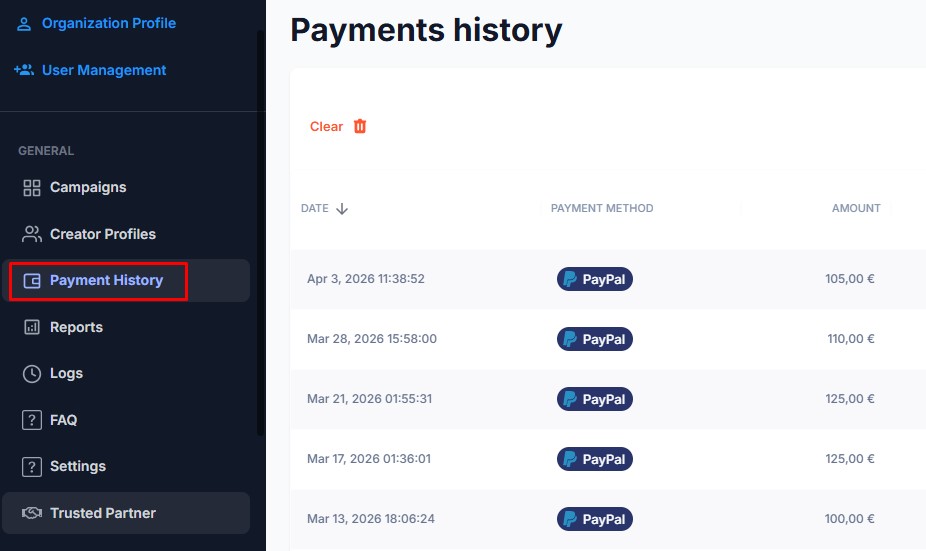
CreatorTraffic also gives creators a separate place to review billing activity after using the funding tools. In the left-side menu, there is a dedicated Payment History section that opens a table-style overview of payment records inside the dashboard.
This area is organized into clear columns: Date, Payment Method, Amount, VAT, Fee, Invoice, and Note. There is also a Date Range filter at the top, which makes it easier to narrow the view when the account starts collecting more payment records over time.
For creators, this section is useful because it creates one place to check how a payment was made, what fee was attached to it, and whether invoice-related information is available. Once the account begins processing real top-ups, Payment History becomes the main place to verify and review billing activity.
Which Payment Option Fits Different Creator Needs
The best payment method on CreatorTraffic depends on how the creator prefers to manage campaigns and budget. For fast online funding, Credit Card is one of the easiest options. It is simple, direct, and also unlocks the platform’s auto-renewal feature, which can be helpful for creators running campaigns on a regular basis.
PayPal makes more sense for creators who already keep funds in PayPal and want to use a familiar checkout flow. It is still quick, but the fee is slightly higher. Crypto may appeal to creators who already work with wallets and prefer blockchain-based payments, but it requires more attention during checkout, especially when choosing the token and network.
For creators who care most about minimizing extra charges, Bank Wire / Transfer is the strongest option. It takes more manual effort and may not feel as instant, but it avoids payment fees entirely. That can make a real difference over time, especially for larger or repeated top-ups.
Conclusion
CreatorTraffic gives creators several ways to fund their account, and each one fits a different working style. Some options are built for speed. Others are better for cost control. Some are more familiar, while others are better suited to creators who want automation or already use crypto.
The main thing is knowing how the system is structured before money is added. Registration comes first, then the Organization Profile must be completed, and only after that does the full payments area unlock. Once that setup is done, the funding process becomes much easier to navigate. For creators planning to use paid traffic consistently, understanding these payment options can help avoid delays, reduce unnecessary fees, and keep campaigns running more smoothly.